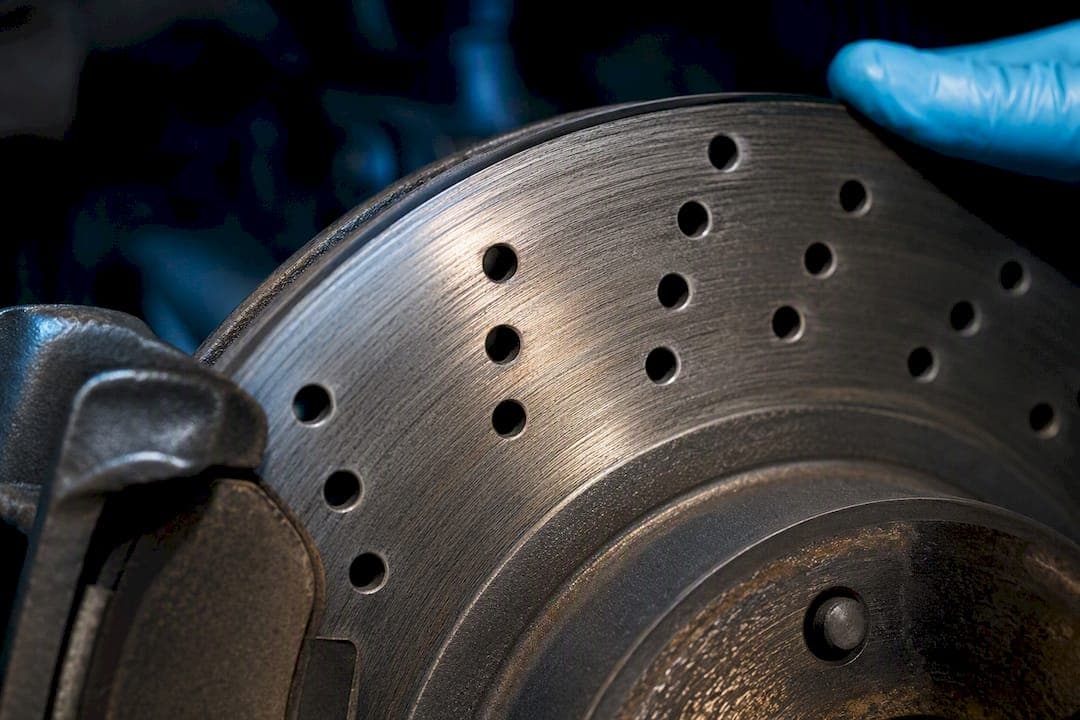
A clicking, ticking, or light whirring from drilled or slotted rotors is usually normal, especially in the first few hundred kilometres after installation. Grinding, loud vibration through the pedal, or any visible crack is not normal and calls for an immediate wheel-off inspection. Start there: pull the wheel, look at the rotor face and holes for cracks, deep scoring, or debris, and check that nothing metallic is dragging before you drive further.
TL;DR:
- Most noises like clicking, whirring, or whooshing from drilled and slotted rotors are normal and often occur during the initial bedding process or due to airflow.
- Metallic grinding or vibrations indicate urgent issues such as scoring, pad wear to the backing plate, or rotor structural problems, requiring immediate inspection.
- Proper bedding, cleaning, and matching pad compounds can significantly reduce brake noise, especially during the first few hundred miles of new rotors.
- Drilled rotors carry a higher risk of cracking under extreme thermal stress, particularly on track use or towing, despite manufacturing measures like chamfering and heat treatment.
- For quieter braking, a coated blank rotor with street pads is preferable, while high-performance drilled rotors are better suited for wet conditions and aggressive driving.
Table of Contents
- Common noises from drilled rotors and slotted rotors, and what each one means
- Why do drilled and slotted rotors make noise in the first place?
- Could bedding-in or installation be causing the noise?
- How do you tell if the noise is coming from the rotor, pad, caliper, or bearing?
- What actually fixes noisy drilled or slotted rotors?
- What technical standards back this troubleshooting advice?
- Is quiet braking or extra bite the right trade-off for you?
- Get engineered rotors built to run quiet and stay crack-resistant
- Sources
- FAQ
Common noises from drilled rotors and slotted rotors, and what each one means
Not every sound coming from your brakes points to a fault. Drilled and slotted rotors are cut or drilled on purpose, and that geometry changes how they sound compared to a plain rotor. Knowing which noise you're hearing narrows the list fast.
- Clicking or ticking: Usually the pad edge catching a slot as it rotates. Forum reports describe this as a "card in spokes" sound that's common after installing slotted or drilled rotors and tends to fade with bedding.
- Whirring or roaring: Often the pad interacting with the hole pattern, or airflow moving through the holes at certain speeds.
- Whooshing at highway speed: Air passing through the drilled holes. This is aerodynamic, not mechanical, and it's one of the documented trade-offs of drilled rotor design.
- Humming or a steady drone: Points to something less benign — an uneven pad transfer layer, glazing, or lateral runout.
- Metallic grinding or a vibration you can feel: Treat this as urgent. It can mean scoring, a pad worn to the backing plate, or a structural issue with the rotor itself.
The first four are things drilled and slotted rotors commonly do. The fifth is a different category entirely, and it's the one that should stop you from driving further until it's checked.
Why do drilled and slotted rotors make noise in the first place?
The noise isn't random. Slots and holes change how the rotor and pad interact, and that has predictable acoustic consequences. A slot creates a brief gap in contact every time it passes under the pad. Multiply that by wheel speed and you get a rapid series of micro-impacts, which your ear reads as a tick or a buzz rather than individual clicks.
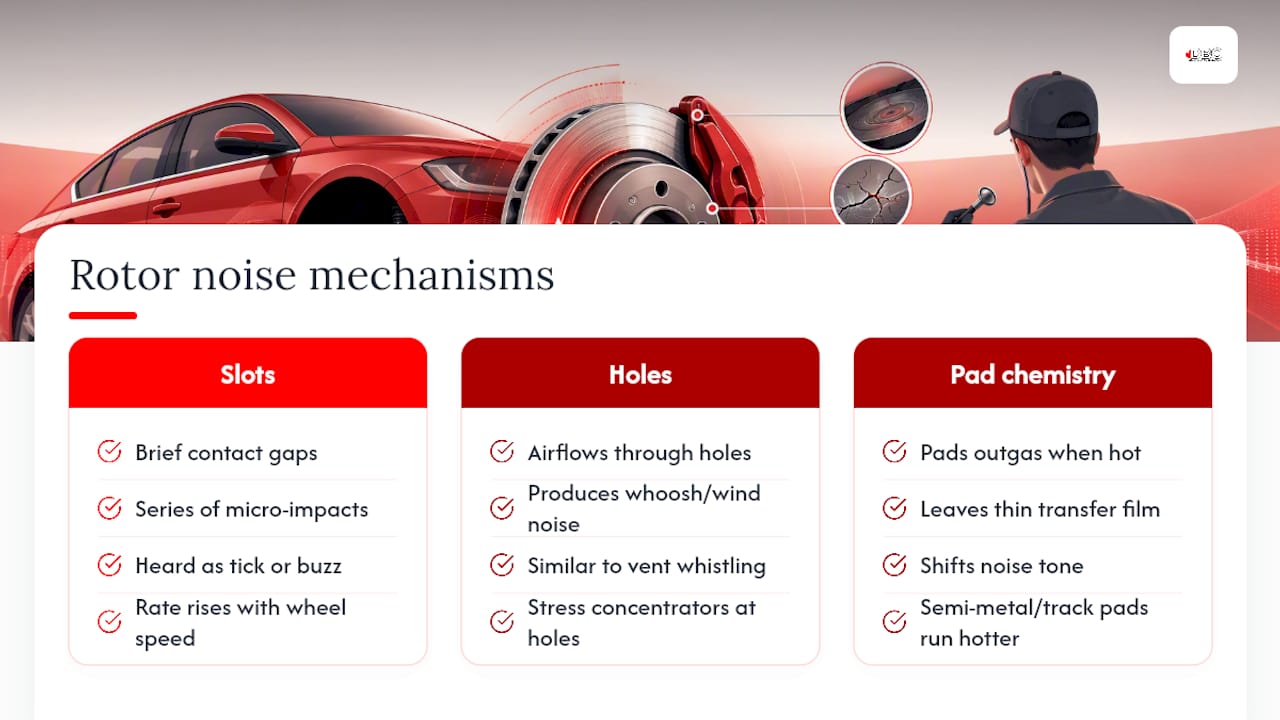
Holes work differently. At speed, air moves through them, and that airflow is what produces the whoosh or wind noise some drivers notice on the highway. It's the same principle as a slotted vent whistling in a strong crosswind, just smaller in scale and closer to your wheel well.
Pad chemistry adds another layer. As pads heat up, they release gases and lay down a thin transfer film on the rotor face. That process, called outgassing, can shift the tone of the noise you hear, especially with semi-metallic or track-oriented pads that run hotter than street compounds.
Holes are also stress concentrators. Wherever material is removed from a disc under thermal load, that spot experiences more strain than the surrounding surface. Chamfering the hole edges and controlling the heat treatment during manufacturing both reduce crack risk, but drilled rotors still carry a higher failure risk under extreme thermal stress than solid discs, particularly on track. That's the design trade-off: better cold-bite and wet-weather clearing versus a bit more noise and, under abuse, more risk.
Could bedding-in or installation be causing the noise?
Almost certainly, if the rotors are new. A new rotor and a new pad haven't built a transfer layer yet, and until they do, contact is uneven and noisy. Several forum accounts describe noise that reduces after several hundred miles of proper bedding, which lines up with what most brake manufacturers recommend as a break-in period.
Run through this before assuming something's wrong:
- Confirm you bedded the brakes properly. A complete bedding procedure generally calls for a series of controlled stops from moderate speed, with cooling time between each, to lay down an even pad deposit.
- Check you're not running old pads on new rotors. Reused pads carry the transfer layer from the old rotor's surface, and that mismatch is a frequent cause of persistent noise.
- Clean the rotor before install. Manufacturer coatings, packaging film, and light surface rust in the holes or slots can all cause noise until they wear off or get cleaned out.
- Verify correct torque sequence and hardware. Uneven lug torque or reused, worn shims can create inconsistent pad contact across the rotor face.
- Give it time, but not unlimited time. Break-in noise typically fades within the first few hundred kilometres. If it hasn't improved by then, something else is going on.
How do you tell if the noise is coming from the rotor, pad, caliper, or bearing?
A systematic check beats guessing, and it doesn't take long. Work through these steps in order, and stop as soon as you find the source.
- Look first. Inspect the rotor face for cracks, heavy scoring, or glazing, and check the pads for uneven wear or a worn-through friction layer. Clear any debris from the holes or slots. Heavy brake dust buildup in the holes is a surprisingly common culprit, and safely removing that dust before you assume the rotor is faulty can save you a needless replacement.
- Spin the wheel off the ground. Listen for a rhythmic tick tied to rotation and check for play by rocking the wheel top and bottom, which points to a bearing rather than a brake component.
- Drive it and reproduce the noise. Brake gently at low speed, then again at moderate speed, and note whether the sound changes with speed or brake pressure.
- Pull the wheel again and check contact patterns. Look at how the pad is wearing across its face, whether the backing plate touches the caliper bracket, and whether rivets are close to the friction surface.
- Measure runout if the noise is a hum or vibration. Lateral runout and disc thickness variation beyond a few thousandths of an inch will produce a pulsing or humming noise that has nothing to do with the rotor's drilled design.
Pro Tip: If you can reproduce the noise with the vehicle stationary and the wheel spinning freely, it's almost always rotor, pad, or bearing related, not something aerodynamic. Aerodynamic whoosh only shows up at real road speed.
Stop driving and get the vehicle inspected immediately if you feel pulsation through the pedal, hear grinding, or spot a crack that extends across the rotor's face rather than stopping at a hole edge.
What actually fixes noisy drilled or slotted rotors?
Most fixes are cheaper and simpler than a full rotor swap. Work from the bottom of this list up.
- Clean the rotor and de-glaze the pads. Light sanding of a glazed pad surface, combined with clearing debris from the holes and slots, resolves a surprising share of noise complaints on their own.
- Match your pad compound to the rotor. Organic pads run quieter but wear faster; semi-metallic and track compounds bite harder but produce more noise and dust. A structured troubleshooting pass before buying new parts often finds a $60 fix instead of a full parts swap.
- Use shims and anti-squeal compound on the pad backing plate for stubborn, high-pitched squeal that persists after cleaning.
- Resurface only within thickness limits. A rotor can be machined if it still meets the minimum thickness spec after cutting. Cracks, perforation through a hole wall, or exposed rivets mean replacement, not resurfacing.
- Reconsider drilled rotors for heavy track or towing duty. If your driving involves sustained high heat, a slotted or coated blank design may hold up better with less noise and lower crack risk over time.
Pro Tip: Before you spend money on new rotors, spend ten minutes with brake cleaner and a stiff brush on the holes and slots. It's the cheapest diagnostic step you have, and it fixes noise more often than owners expect.
What technical standards back this troubleshooting advice?
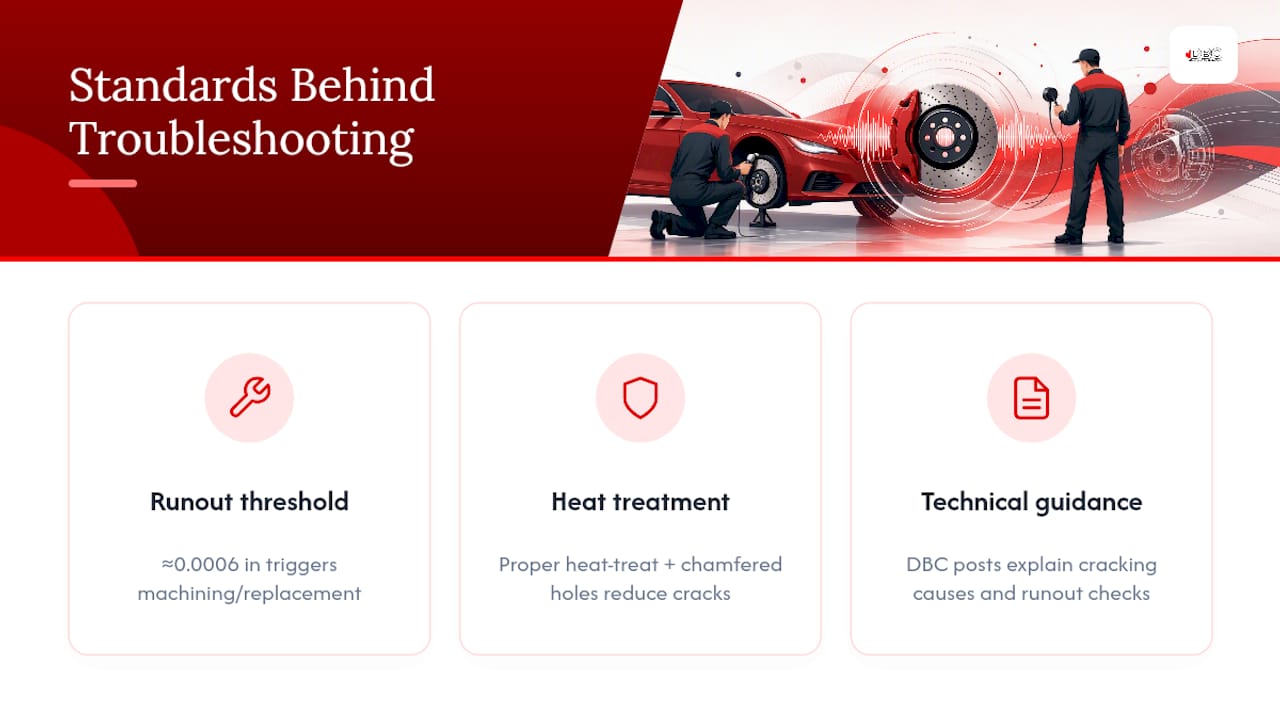
Rotor noise complaints often come down to tolerances most owners never measure. DBC Brakes' technicians flag lateral runout and disc thickness variation above roughly 0.0006 inches as a trigger point for machining or replacement, since runout at that level produces humming or vibration that gets mistaken for normal drilled-rotor character.
Heat treatment matters just as much. A properly heat-treated rotor with chamfered hole edges resists the stress concentration that drilled designs are naturally prone to, which is why manufacturing quality changes crack risk under repeated thermal cycling even between rotors that look identical on the shelf.
For readers who want the deeper mechanics, DBC Brakes' technical posts cover why drilled rotors crack on track and the habits that prevent rotor warping, including the runout checks a technician would actually run.
Is quiet braking or extra bite the right trade-off for you?
Some drivers accept a bit of extra tick or whoosh in exchange for better wet-weather clearing and a pad surface that stays cleaner under hard use. That's a fair trade for a weekend track car or a truck that tows. It's a worse trade for someone who drives quietly in the city every day and just wants predictable, silent stops.
If silence matters more to you than aggressive bite, a coated blank rotor paired with a street-oriented pad will usually serve you better than fighting the inherent character of a drilled design.
Match the rotor to how you actually drive, not to how the car looks in photos.
— Sam
Get engineered rotors built to run quiet and stay crack-resistant
Some brake manufacturers engineer cross-drilled rotors with chamfered hole edges and controlled heat treatment specifically to cut down on the stress concentration and noise that plague poorly made drilled discs. That's the real difference between a rotor that ticks for a week and settles down, and one that cracks two seasons in.
Brake kits may ship with inclusive pricing and no hidden fees, and some support teams answer fitment questions directly instead of routing customers through automated replies. Browse the Performance XDB, Premium Black Kote, and Performance SS lineups to find the rotor built for your driving style, or check front and rear rotor options by fitment. Orders over $100 ship free within Canada, and if you need it faster, expedited shipping gets it to your door sooner for $29.99. Start with the fitment guide on the product page and get the right kit ordered before your next brake job.
Sources
- Drilled vs Slotted Rotors: The Ultimate Engineering Guide | AME Motorsport
- Drilled/Slotted rotors noise. | Dodge Challenger Forum
- Drilled, Slotted Brake Noises - S2KI Honda S2000 Forums
FAQ
How long does it take to break in drilled and slotted rotors?
Most noise from new drilled or slotted rotors fades within a few hundred kilometres of normal driving, once a proper bedding procedure has laid down an even pad transfer layer. If the noise hasn't improved by then, check for reused pads, leftover coatings, or debris in the holes before assuming the rotor itself is faulty.
What are the disadvantages of drilled rotors?
Drilled rotors carry a higher crack risk under extreme thermal stress than solid rotors, particularly under heavy track or towing use, and the holes can produce whooshing or humming noise at speed. Chamfered edges and proper heat treatment reduce this risk but don't eliminate it entirely.
Is it normal for new rotors to make noise?
Yes, light clicking, ticking, or whirring is common on new drilled or slotted rotors and usually fades as the pad and rotor bed in together. Grinding, pulsation through the pedal, or a visible crack is never normal and needs inspection right away.
What noise do rotors make when bad?
A failing rotor typically produces metallic grinding, a deep groan under braking, or a pulsing vibration felt through the pedal or steering wheel. These signs point to scoring, excessive runout, or a pad worn down to its backing plate, and any of them warrants stopping to inspect the brakes before driving further.